- Thread Author
- #1
Hi All, have a Dell Inspiron 15z 5523, bios update went wrong.
I bought a EZP2019 USB Programmer, watched a few videos and as Im still learning soldering thought I would give the clamp a try.
All good, connected to Bios, clicked test but 1st image gives me ' Please manually select the corresponding type burn ' Why cant my first Bios attempt go smoothly.. :-(
I assume manufacturer and name of chip is correct?
I downloaded the bin file from this site
All good, stuff on screen looks like it loaded fine
However, just as a try ( had that burn statement in image 1 ) Image 3 says File length is larger than chip capacity.
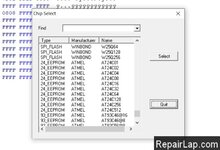
Is this because I do not have the right chip name? Image 4 gives me manual choice of 24_eeprom chips
Bios chip says
MXIC MX
25L6406E
M21-12G
3L376000
L124083
none of this show in the EZP2019 menu
Appreciate any advice .
Thanks
Bill
I bought a EZP2019 USB Programmer, watched a few videos and as Im still learning soldering thought I would give the clamp a try.
All good, connected to Bios, clicked test but 1st image gives me ' Please manually select the corresponding type burn ' Why cant my first Bios attempt go smoothly.. :-(
I assume manufacturer and name of chip is correct?
I downloaded the bin file from this site
All good, stuff on screen looks like it loaded fine
However, just as a try ( had that burn statement in image 1 ) Image 3 says File length is larger than chip capacity.
Is this because I do not have the right chip name? Image 4 gives me manual choice of 24_eeprom chips
Bios chip says
MXIC MX
25L6406E
M21-12G
3L376000
L124083
none of this show in the EZP2019 menu
Appreciate any advice .
Thanks
Bill