Ask Lenovo Legion T7-34IMZ5 - Type 90Q9 - IZ490AE2 VER 1.3 - 5B20W27659

Zroepp

Member (✔)
Joined
Oct 15, 2025
Messages
8
Hi,

After a bios update from the official lenovo website the pc never turned back on.

I've attached the bios backup that I've taken after the failed update with a CH341a. ( 3,3v mod )

Lenovo Legion T7-34IMZ5 - Type 90Q9 - IZ490AE2 VER 1.3 - 5B20W27659
 

Attachments

Already flashed and verified, turns on for about 4-5 seconds and then it turns back off. Before that it would only turn on for 2 seconds max.
Legion T7-34IMZ5 Desktop (Lenovo) - Type 90Q9
Clean Bios
 

Attachments

Same as before... I've attached my flashes of your files, I've compared them with HxD and they are the same.
They are not the same :
2.webp
1.webp
You need to check for a hardawre Problem .
 
Will do, I'll let you know how it goes.
Here a full Guide on how to do a Clean Me Region :

 
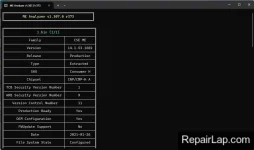
I've opened your files from the archive and they are still "Configured", which files do I need to use to clean the ME region?

I also have error "Unable to open file" in the Intel Flash Image Tool
 
Last edited:
Just what I did upload above, bought of them 8MB & 16MB
 
Just what I did upload above, bought of them 8MB & 16MB
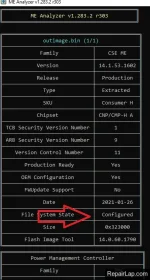
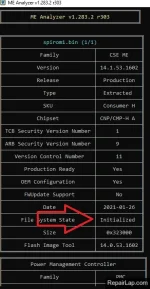
Your file appears as "Configured", the guide says that it needs to be "Initialized", also, despite everything, I still can't open any file in the Intel Flash Image Tool, i says "Unable to open file" and "Reverting to default configuration."
 

Attachments

  • Screenshot 2025-10-15 152550.webp
    Screenshot 2025-10-15 152550.webp
    51.9 KB · Views: 1
I've opened your files from the archive and they are still "Configured", which files do I need to use to clean the ME region?

I also have error "Unable to open file" in the Intel Flash Image Tool
Did you understand what I did send above, you should use bought Bios one for Spi of 8mb and the other one for Spi 16mb .
 
Did you understand what I did send above, you should use bought Bios one for Spi of 8mb and the other one for Spi 16mb .
I know, that's what I did, and it doesn't work...

Should I try to flash them again?
 
Your file appears as "Configured", the guide says that it needs to be "Initialized", also, despite everything, I still can't open any file in the Intel Flash Image Tool, i says "Unable to open file" and "Reverting to default configuration."
If you need to open the bios files with FIT they must be merged first 8+16= 24mb than use the tool to clean by your self .
Note : not every laptop or desktop with two Bios need to be merged .
 
If you need to open the file Bios with intel they must be merged first 8+16= 24mb than use the tool to clean by your self .
Note : not every laptop or desktop with two Bios need to be merged .
I did merge the files, yet it still won't open in FIT...

Also, I'm using v14
 

Attachments

Latest posts

Back
Top Bottom