
You are using an out of date browser. It may not display this or other websites correctly.
You should upgrade or use an alternative browser.
You should upgrade or use an alternative browser.
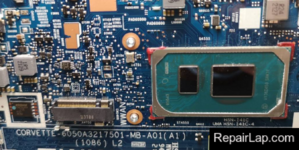
HP ELITEBOOK 840 G8 11TH GEN CORVETTE-6050A3217501-MB-A01(A1) Bios
- Thread starter admin
- Start date

- Joined
- Mar 8, 2026
- Messages
- 8

- Joined
- Dec 2, 2017
- Messages
- 32,986
- Thread Author
- #5
Hello friend
i need your help to fix bios no display
Attachments
- Joined
- Mar 8, 2026
- Messages
- 8
i have picture but its in loop
on the screen its written
"First Step of Bios recovery is in progress"
please help fix
on the screen its written
"First Step of Bios recovery is in progress"
please help fix
- Joined
- Dec 2, 2017
- Messages
- 32,986
- Thread Author
- #7
Change the EEPROM ic and reprogram again .i have picture but its in loop
on the screen its written
"First Step of Bios recovery is in progress"
please help fix
- Joined
- Mar 8, 2026
- Messages
- 8
Hi
I succeded to find 2 bios files that worked
1 - top bios is the original bios
2 - buttom bios EC i made with DMI tool in your site
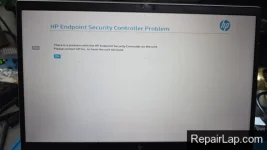
the laptop works but im getting in the begining the HP ENDPOINT SECURITY CONTROL
attched the 2 flles that are working please help remove the security screen
I succeded to find 2 bios files that worked
1 - top bios is the original bios
2 - buttom bios EC i made with DMI tool in your site
the laptop works but im getting in the begining the HP ENDPOINT SECURITY CONTROL
attched the 2 flles that are working please help remove the security screen
Attachments
- Joined
- Dec 2, 2017
- Messages
- 32,986
- Thread Author
- #9
User This tool :Hi
I succeded to find 2 bios files that worked
1 - top bios is the original bios
2 - buttom bios EC i made with DMI tool in your site
the laptop works but im getting in the begining the HP ENDPOINT SECURITY CONTROL
attched the 2 flles that are working please help remove the security screen
- Joined
- Mar 8, 2026
- Messages
- 8
Hi
I managed to pass the security screen secssesfully with your help
now im missing bios infos
i managed to take out from my original bios the info but im stuck on
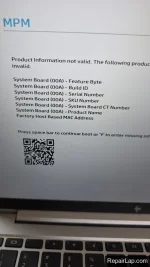
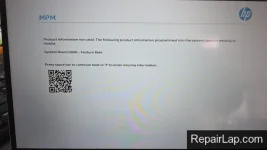
System Board (00A) - Feature Byte missing
im attaching the working bios after security clear and the original please help to enter the info i tried almost 4 hours
also im getting manufacture screen mode on counter #1 even if i changed the bios with BCU software
I managed to pass the security screen secssesfully with your help
now im missing bios infos
i managed to take out from my original bios the info but im stuck on
System Board (00A) - Feature Byte missing
im attaching the working bios after security clear and the original please help to enter the info i tried almost 4 hours
also im getting manufacture screen mode on counter #1 even if i changed the bios with BCU software
Attachments
-
top_orginal _HP by BIOS-UNLOCK.BIN32 MB · Views: 1
-
top_orginal .BIN32 MB · Views: 1
-
 WhatsApp Image 2026-04-01 at 13.40.22.webp197 KB · Views: 7
 -
 WhatsApp Image 2026-04-01 at 12.30.41 (1).webp225.9 KB · Views: 8
 -
 WhatsApp Image 2026-04-01 at 11.55.20.webp128.9 KB · Views: 9
 -
 WhatsApp Image 2026-04-01 at 13.44.26.webp285.4 KB · Views: 8
- Joined
- Dec 2, 2017
- Messages
- 32,986
- Thread Author
- #11
I didn't understand what you want to do exactly, are you trying to unlock Password if so than upload your Bios backup and need to know what model exactly and serial number .Hi
I managed to pass the security screen secssesfully with your help
now im missing bios infos
i managed to take out from my original bios the info but im stuck on
System Board (00A) - Feature Byte missing
im attaching the working bios after security clear and the original please help to enter the info i tried almost 4 hours
also im getting manufacture screen mode on counter #1 even if i changed the bios with BCU software
- Joined
- Mar 8, 2026
- Messages
- 8
no my friend
No need password
No need Security password control
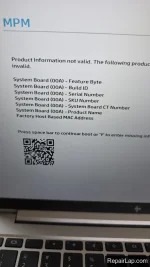
i only need to enter the SN , Model ,Buil,Featue.........
all the missing paramneters (from top_original to top_original_HP by bios unlock chip )
see inthe picture all the Mainboard info is missing
No need password
No need Security password control
i only need to enter the SN , Model ,Buil,Featue.........
all the missing paramneters (from top_original to top_original_HP by bios unlock chip )
see inthe picture all the Mainboard info is missing
Attachments
- Joined
- Mar 8, 2026
- Messages
- 8
OK send me the bios backup
Attachments
- Joined
- Mar 8, 2026
- Messages
- 8
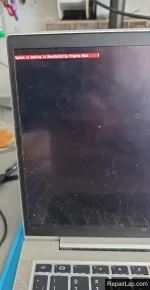
with the bios you gave me i get problem 7 times caps lock blinkHP EliteBook 840 G8
corvette-6050A3217501-MB-A01
11th GEN CPU bios ok
please help fix
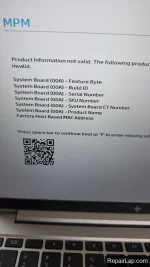
i will explain again im uploading the working bios(working no manufactur info.bin) but i dont have inside:
Product Name
Product SKU
Serial Number
system Board CT Number
Build ID
Feature Byte
Manufacturing Programming Mode
becaouse no info so im getting open scrren failiure
please help
Attachments
- Joined
- Dec 2, 2017
- Messages
- 32,986
- Thread Author
- #18
But where is your original Bios, here is check this.with the bios you gave me i get problem 7 times caps lock blink
please help fix
i will explain again im uploading the working bios(working no manufactur info.bin) but i dont have inside:
Product Name
Product SKU
Serial Number
system Board CT Number
Build ID
Feature Byte
Manufacturing Programming Mode
becaouse no info so im getting open scrren failiure
please help
Attachments
Similar threads

- Replies
- 0
- Views
- 147
- Replies
- 0
- Views
- 609
- Replies
- 0
- Views
- 856
- Replies
- 1
- Views
- 875
Latest posts
-
HP Pavilion DV7-1010eo JBK00 LA-4092P BoardView
- Started by admin
- Replies: 0
-
-
-